Paperclip sample app part 2: downloading files through a controller
Last time I wrote about how to quickly setup a Rails application using scaffolding that allows users to upload image files and then display them using the Paperclip plugin. Paperclip does the simplest thing possible by default: it saves the file attachments right on the file system of your web server, allowing you to download them to users easily using Apache or whatever web server you have installed.
Today I’d like to take that sample app one step further and show how to use a Rails controller to download the files, instead of directly through Apache. To get the finished code just go to http://github.com/patshaughnessy/paperclip-sample-app and look at the “part2” folder.
There are a variety of reasons why you might want to do this, including:
- Security: you don’t want to expose all of the file attachments to all users of your web site. Instead, you want to implement some business rules and show some files to some users, but not to others.
- Auditing/logging: you want to keep track of who is viewing which files, or how many times they are viewing them.
- You want to hide the actual location of the files from users, and instead map the files to URLs in some other pattern or manner.
- Or, you might want not want to store the files on your web server’s file system at all, but instead in a database table or somewhere else. In Part 3 of this series, I’ll show how to do this…
The common thread here is that you want to execute some Ruby code every time a users accesses a file, and the way to do that is by routing the download requests through a controller.
Let’s pick up where we left off last time:
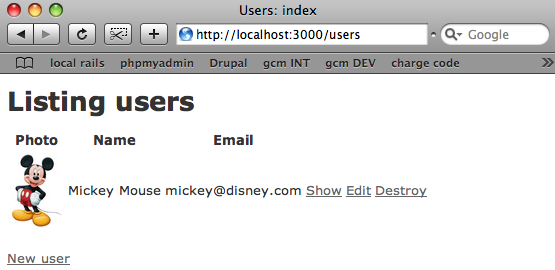
If we take a look at some of the HTML source for this page:
<h1>Listing users</h1>
<table>
  <tr>
    <th>Photo</th>
    <th>Name</th>
    <th>Email</th>
  </tr>
<tr>
    <td><img alt="Mickey-mouse"
      src="/system/avatars/1/thumb/mickey-mouse.jpg?1242395876" /></td>
    <td>Mickey Mouse</td>
    <td>mickey@disney.com</td>
    <td><a href="/users/1">Show</a></td>
    <td><a href="/users/1/edit">Edit</a></td>
… we can see that Paperclip’s “url” function which we called in index.html.erb is returning a pointer to the actual location of the file on the web server’s hard drive, under the public/system folder:
$ find public/system
public/system
public/system/avatars
public/system/avatars/1
public/system/avatars/1/original
public/system/avatars/1/original/mickey-mouse.jpg
public/system/avatars/1/small
public/system/avatars/1/small/mickey-mouse.jpg
public/system/avatars/1/thumb
public/system/avatars/1/thumb/mickey-mouse.jpg
Now let’s say that we want to implement some simple security around these images…. reason #1 from my list above. The first thing we’ll need to do, then, is to remove the image files from the public folder and instead save them in some non-public place on our web server, for example:
$ mkdir non-public
$ mv public/system non-public/.
Now let’s double check that Apache can’t find the files in their new location:
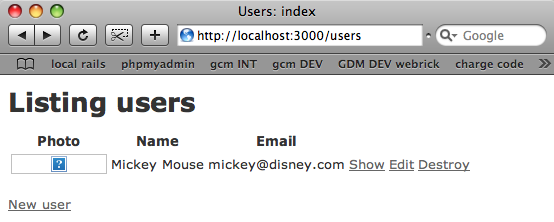
Great! We see a missing image as expected. No users can see the files unless we run some bit of Ruby code to enable access. Now… how can we use a controller to download the files through Rails, instead of through Apache? The first thing we need to do is add a route to routes.rb for accessing the files.
If you open up routes.rb and look at what the scaffolding generator created for us, you’ll see this:
ActionController::Routing::Routes.draw do |map|
  map.resources :users
  ...etc...
  map.connect ':controller/:action/:id'
  map.connect ':controller/:action/:id.:format'
end
The map.resources line indicates that our application supports a series of routes that handle the four REST actions: GET, POST, PUT and DELETE. The best way to get a handle on how the routes work is by running “rake routes” to list out all the URL patterns that Rails will match on:
$ rake routes
(in /Users/pat/rails-apps/paperclip-sample-app)
    users GET    /users(.:format)          {:action=>"index", :controller=>"users"}
          POST   /users(.:format)          {:action=>"create", :controller=>"users"}
 new_user GET    /users/new(.:format)      {:action=>"new", :controller=>"users"}
edit_user GET    /users/:id/edit(.:format) {:action=>"edit", :controller=>"users"}
     user GET    /users/:id(.:format)      {:action=>"show", :controller=>"users"}
          PUT    /users/:id(.:format)      {:action=>"update", :controller=>"users"}
          DELETE /users/:id(.:format)      {:action=>"destroy", :controller=>"users"}
                 /:controller/:action/:id
                 /:controller/:action/:id(.:format)
The last two lines are the “default routes,” which connect any URL matching the pattern controller/action/id to the corresponding controller. We could just go ahead and use the default routes, but to learn a bit more about how map.resources works, let’s create a new URL pattern for our users that we’ll use in a minute to download the avatar file attachments with. Edit routes.rb and add the :member parameter in bold:
ActionController::Routing::Routes.draw do |map|
  map.resources :users, :member => { :avatars => :get }
etc...
If we now re-run rake routes, we can see that a new URL pattern was created for us that we can use to download the avatar images via a GET request:
$ rake routes
(in /Users/pat/rails-apps/paperclip-sample-app)
      users GET    /users(.:format)          {:action=>"index", :controller=>"users"}
            POST   /users(.:format)          {:action=>"create", :controller=>"users"}
   new_user GET    /users/new(.:format)      {:action=>"new", :controller=>"users"}
  edit_user GET    /users/:id/edit(.:format) {:action=>"edit", :controller=>"users"}
avatars_user GET   /users/:id/avatars(.:format) {
                                              :action=>"avatars",
                                              :controller=>"users"
                                             }
       user GET    /users/:id(.:format)      {:action=>"show", :controller=>"users"}
            PUT    /users/:id(.:format)      {:action=>"update", :controller=>"users"}
            DELETE /users/:id(.:format)      {:action=>"destroy", :controller=>"users"}
                   /:controller/:action/:id
                   /:controller/:action/:id(.:format)
Now to get the avatar for user 7, for example, we can issue a URL like this:
http://localhost:3000/users/7/avatars
… and the request will be routed to the “avatars” action in the “users” controller (plural since a user might have more than one style of avatar). So now let’s go right ahead and implement the avatars method and add some code to download a file to the client. The way to do that is to use ActionController::Streaming::send_file. It’s simple enough; we just need to pass the file’s path to send_file as well as the MIME content type which the client uses as a clue for deciding how to display the file, and that’s it! Let’s hard code these values for now and see if it all works (update the path here for your machine):
class UsersController < ApplicationController
  def avatars
    send_file '/path/to/non-public/system/avatars/1/original/mickey-mouse.jpg',
      :type => 'image/jpeg'
  end
Now if you type http://localhost:3000/users/1/avatars into your browser you should see the mickey image again. If not, then double check your code changes, where the files are actually located on the hard drive now and also try stopping and reloading the Rails app since changes to routes.rb are cached and are only loaded when Rails is initialized.
Instead of hard coding the path in the avatars method, we obviously need to be able to handle requests for any avatar file attachment for any user record. Before we enhance our code to do this, let’s take a few minutes to configure Paperclip and tell it where the files are now stored on the file system, and which URL we have configured our routes.rb file to use. This will make our work coding in the controller a lot easier, and also indicate to Paperclip where new file attachments should be uploaded to. To do this, we need to add a couple of parameters to our call to has_attached_file in our User model (user.rb), shown here in bold (again, update the path for your machine):
class User < ActiveRecord::Base
  has_attached_file :avatar,
    :styles => { :thumb => "75x75>", :small => "150x150>" },
    :path => '/path/to/non-public/system/avatars/1/original/mickey-mouse.jpg',
    :url => 'users/1/avatars'
end
Just to take one step at a time, I’ve hard coded the URL and path again here in the model. But now we can generalize our code in UserController to handle any user, like this:
def avatars
  user = User.find(params[:id])
  send_file user.avatar.path, :type => user.avatar_content_type
end
Now we can test http://localhost:3000/users/1/avatars again to be sure that we haven’t broken anything. If it’s all working, lets’ proceed to clean up the hard coding in user.rb. It turns out that Paperclip uses the same interpolations idea that we saw above in routes.rb. So I can use symbols like :rails_root, :id, :style, etc., and they will be evaluated to the values I expect and need. Here’s the finished code in my model:
has_attached_file :avatar,
  :styles => { :thumb => "75x75>", :small => "150x150>" },
  :path =>
    ':rails_root/non-public/system/:attachment/:id/:style/:basename.:extension',
  :url => '/:class/:id/:attachment'
If we open up the console and take a look at our user object there, we can see that Paperclip is substituting the correct values for each of the symbols I’ve provided:
$ ./script/console
Loading development environment (Rails 2.3.2)
>> User.first.avatar.url
=> "/users/1/avatars?1242395876"       (time stamp appended here automatically)
>> User.first.avatar.path
=> "/Users/pat/.../non-public/system/avatars/1/original/mickey-mouse.jpg"
Now let’s go back and test our original application again with our new code:
- The new route in routes.rb
- The new action in UserController
- And the :url and :path parameters added to has_attached_file in the User model.
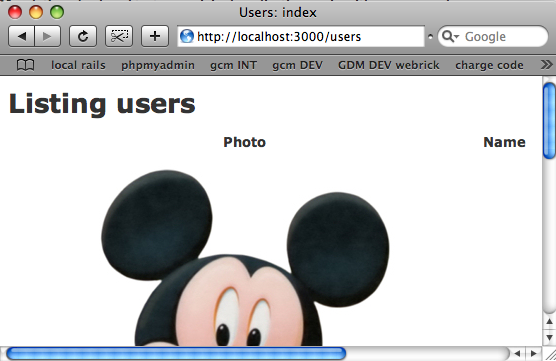
Oops… we see the large image again. It doesn’t work! What happened? Well, it turns our that we forgot one detail in our new avatars method in UserController. Our code always returns the default, or “original” style of the file attachment, but in the users index view we actually display the thumbnail image using image_tag user.avatar.url(:thumb). So our controller code needs to be able to handle requests for other styles as well. To do this, we need to pass the requested style somehow. The simplest thing to do is just to add the style as a URL parameter to the download request, like this:
http://localhost:3000/users/1/avatar?style=thumb
(We could also add the style to the URL's path, but that would require another change to routes.rb.) To make this work, first I need to tell Paperclip about how I want to handle the style value in the URL:
has_attached_file :avatar,
  :styles => { :thumb => "75x75>", :small => "150x150>" },
  :path =>
    ':rails_root/non-public/system/:attachment/:id/:style/:basename.:extension',
  :url => '/:class/:id/avatar?style=:style'
And now I need to handle this new parameter in my controller:
def avatars
  user = User.find(params[:id])
  style = params[:style] ? params[:style] : 'original'
  send_file user.avatar.path(style),
            :type => user.avatar_content_type
end
I don’t need to change anything in index.html.erb since there we call image_tag user.avatar.url(:thumb) which picks up the new URL pattern from Paperclip.
And now, if I’ve got all of this correct, I should be able to finally see the thumbnail image again on the index page:
And finally we have files being downloaded by Ruby code present in the UserController class. If we actually wanted to implement security, logging or some other sort of logic we would just add code to the avatars method in UserController. For example, avatars could return a 401 (unauthorized) error if the user wasn’t logged in, or didn’t have access to view Mickey’s image for some reason.
That’s it for now; next time I’ll modify this sample app once more to demonstrate how we can store the image files in a database table, instead of in the “non-public” folder or anywhere on the file system.