I just updated View Mapper to work with my fork of the Rails auto_complete plugin that allows for repeated text fields on the same complex form. This means that View Mapper can now generate scaffolding code that uses both nested attributes and the auto_complete plugin at the same time, to display a form like this:
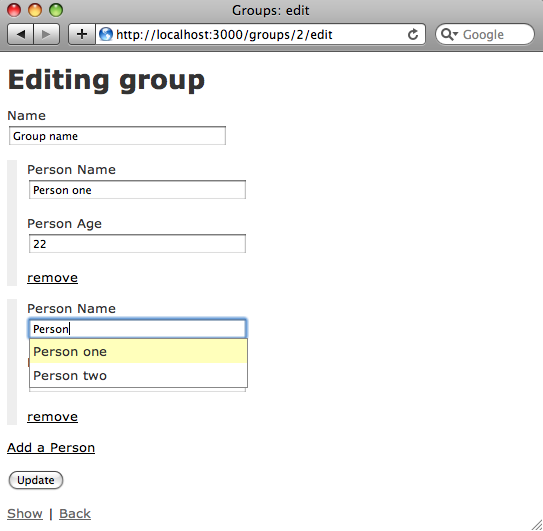
To generate this sort of complex form for two of your models you’ll first need to install my “repeated_auto_complete” gem from gemcutter.org:
$ gem sources -a http://gemcutter.org http://gemcutter.org added to sources $ sudo gem install repeated_auto_complete Successfully installed repeated_auto_complete-0.1.0 1 gem installed Installing ri documentation for repeated_auto_complete-0.1.0... Installing RDoc documentation for repeated_auto_complete-0.1.0...
To learn more about repeated_auto_complete and what it does, see: http://patshaughnessy.net/repeated_auto_complete. Now you can generate a complex form like the one shown above for two of your models in a has_many/belongs_to, has_and_belongs_to_many or has_many, :through association by installing View Mapper (version 0.3.1 or later):
$ sudo gem install view_mapper Successfully installed view_mapper-0.3.1 1 gem installed Installing ri documentation for view_mapper-0.3.1... Installing RDoc documentation for view_mapper-0.3.1...
… and then running the “view_for” generator with a view option called “has_many_auto_complete,” like this:
./script/generate view_for group --view has_many_auto_complete:people
Detailed Example
To see how easy it is to create a complex form using View Mapper, let’s create one from scratch in a brand new Rails app. You should be able to follow along using the commands below on your machine. First, let’s create a new Rails application:
$ rails complex_auto_complete
create
create app/controllers
create app/helpers
create app/models
create app/views/layouts
create config/environments
create config/initializers
create config/locales
… etc..
create log/server.log
create log/production.log
create log/development.log
create log/test.log
The first thing I’ll do is install the auto_complete plugin. However, since I’m planning to use auto_complete on a complex form, I’ll need to get my fork of auto_complete which I’ve deployed as a gem on gemcutter.org:
$ gem sources -a http://gemcutter.org http://gemcutter.org added to sources $ sudo gem install repeated_auto_complete Successfully installed repeated_auto_complete-0.1.0 1 gem installed Installing ri documentation for repeated_auto_complete-0.1.0... Installing RDoc documentation for repeated_auto_complete-0.1.0...
And let’s update my new app to use the repeated_auto_complete gem by editing the config/environment.rb file:
Rails::Initializer.run do |config| …etc… config.gem "repeated_auto_complete" …etc…
If you prefer, you can also install this the old fashioned way, using “script/plugin install git://github.com/patshaughnessy/auto_complete.git”. Next, let’s generate a new model called “person” with a couple of fields for name and age, like the ones shown above in the screen shot:
$ cd complex_auto_complete/
$ ./script/generate model person name:string age:integer group_id:integer
exists app/models/
exists test/unit/
exists test/fixtures/
create app/models/person.rb
create test/unit/person_test.rb
create test/fixtures/people.yml
create db/migrate
create db/migrate/20091125195040_create_people.rb
Note that I’ve also included an integer field for the group id, since in a minute I’ll be adding a belongs_to association for people to groups.
Now I’m ready to use View Mapper… if you haven’t installed that yet, get it from gemcutter.org like this:
$ sudo gem install view_mapper Successfully installed view_mapper-0.3.1 1 gem installed Installing ri documentation for view_mapper-0.3.1... Installing RDoc documentation for view_mapper-0.3.1...
You’ll need at least version 0.3.1 to use auto_complete on a complex form. Now I can use View Mapper to create scaffolding for a new “group” model that has many people with auto_complete like this:
$ ./script/generate scaffold_for_view group name:string
--view has_many_auto_complete:people
error Table for model 'person' does not exist
- run rake db:migrate first.
Yes… I forgot to create the people table in my database; if we do that:
$ rake db:migrate (in /Users/pat/rails-apps/complex_auto_complete) == CreatePeople: migrating =================================================== -- create_table(:people) -> 0.0014s == CreatePeople: migrated (0.0015s) ==========================================
… and then re-run View Mapper:
$ ./script/generate scaffold_for_view group name:string
--view has_many_auto_complete:people
warning Model Person does not contain a belongs_to
association for Group.
… we get a second error message! This time View Mapper is reminding me that I still need to add “belongs_to :group” to the person model in order to get the complex form to work. Let’s do that now:
class Person < ActiveRecord::Base belongs_to :group end
And now I can run View Mapper once more:
$ ./script/generate scaffold_for_view group name:string
--view has_many_auto_complete:people
exists app/models/
…etc…
create app/models/group.rb
create test/unit/group_test.rb
create test/fixtures/groups.yml
exists db/migrate
create db/migrate/20091125195715_create_groups.rb
create app/views/groups/show.html.erb
create app/views/groups/_form.html.erb
create app/views/groups/_person.html.erb
create public/javascripts/nested_attributes.js
route map.connect 'auto_complete_for_group_name',
:controller => 'groups',
:action => 'auto_complete_for_group_name'
route map.connect 'auto_complete_for_person_name',
:controller => 'groups',
:action => 'auto_complete_for_person_name'
route map.connect 'auto_complete_for_person_age',
:controller => 'groups',
:action => 'auto_complete_for_person_age'
Now you can see the new scaffolding files View Mapper created, including some new scaffolding files peculiar to complex forms, like “nested_attributes.js,” “_form.html.erb,” and “_person.html.erb.” You may also have noticed View Mapper added three new routes related to the auto_complete plugin; these will handle the AJAX requests used to return the auto_complete options to the form.
Now to get it all to work, I just need to create the group table:
$ rake db:migrate (in /Users/pat/rails-apps/complex_auto_complete) == CreateGroups: migrating =================================================== -- create_table(:groups) -> 0.0013s == CreateGroups: migrated (0.0014s) ==========================================
Now running my server and creating a new group I see:
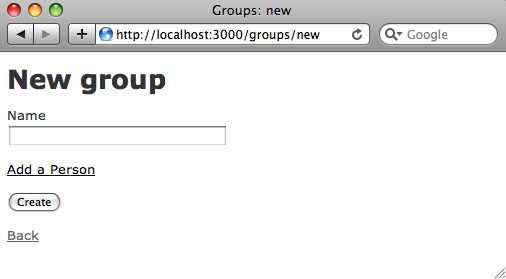
If you click “Add a Person” you’ll see nested fields for new Person records appear. This all works exactly the same way as the standard nested attributes scaffolding that I described in my last post. The only difference is that in this form, each of the text fields present in both the parent (“Group”) and child (“Person”) models are displayed using the “text_field_with_auto_complete” method.
I’ll try to write up a detailed walk through of how this scaffolding actually works as soon as I can… there are a lot of interesting details in the code that will be fun to look at. In the meantime, hopefully this scaffolding will make it easier for you to learn how to use auto_complete and nested attributes together in your app.

24 responses so far ↓
1 Martin Evans // Dec 08, 2009 at 05:41 PM
2 Martin Evans // Dec 08, 2009 at 05:57 PM
3 Martin Evans // Dec 08, 2009 at 06:03 PM
4 Martin Evans // Dec 09, 2009 at 04:17 PM
5 pat // Dec 09, 2009 at 10:43 PM
Hi Martin, some questions:
- Are you getting an error message during the generation step? Or is the problem that the new view code simply doesn’t work?
- Is there an error message of some kind in your Rails log file? (log/development.log) Or on the screen in your browser?
- Are you running the “view_for” generator on an existing model? Or are you using the scaffold_for_view generator like in the detailed example above? If you use view_for on one of your models, then you’ll need to be sure you have “accepts_nested_attributes_for” in your model in order for the attributes to all be saved properly when the forms are submitted. Although if you were missing that View Mapper should have given you a warning...
- If you are using existing models from your app, do you have the has_many, :through associations setup properly? Does the “through” model class contain a foreign key (something_id) for each of the parent models? View Mapper doesn't validate the foreign keys are present for the has_many, :through scenario.
If these questions don’t lead to any solutions, then try sending me some of your code so I can reproduce the problem here. In particular, your model classes might be the most important to look at. You can use pastie or just email it to me. Thanks a lot for trying View Mapper!
6 Adam // Dec 27, 2009 at 12:02 PM
7 Adam // Dec 27, 2009 at 12:03 PM
8 pat // Dec 28, 2009 at 07:36 AM
Hi Adam,
Thanks a lot for trying View Mapper… I’ve actually been thinking about implementing scaffolding for your scenario for a while. It seems like a very common use case: associating existing records rather than creating new ones every time. This could be a “has and belongs to many” view, or maybe a “has many through” view. Anyway, I took some time yesterday to look into this; it turned out to be more difficult than I thought! Sorry for the slow response. Here’s what I was able to do so far:
- I created a sample app using View Mapper with your model names: Tour and Customer. I used has_and_belongs_to_many and a join table like you have.
- I then wrote a method called “remove_existing_customers!” in the ToursController. I posted this code on pastie so you can take a look at it: http://pastie.org/758688. In a nutshell it looks for attributes corresponding to existing customers when a tour is submitted, and removes them so that ActiveRecord does not create new customers records. (ActiveRecord will always create new records for the nested attributes if they don't correspond to an existing, associated child record.) Then the existing customers are added to the tour explicitly later after it has been saved. This code is a bit ugly, but seems to work and should get you started in the right direction. To avoid deleting customers, you can set the “allow_destroy” option to false in your accepts_nested_attribute_for line in the Tour model.
- Then I ran into a problem with the update tour case: I always get “ActiveRecord::ReadOnlyRecord” when I try to update a Tour that contains nested attributes. In order words, I get the ReadOnlyRecord error every time I call update_attributes on the Tour model. I’m not sure what the problem is yet; maybe accepts_nested_attributes_for doesn’t work with the has_and_belongs_to_many case? When I have time, I’ll look into this… it seems very odd.
Let me know if you get the update case to work, or if you have any questions about the remove_existing_customers code. If I can figure out the problem with update someday, I'll clean up the code and post a new view mapper view that would generate this scaffolding in one step.
Hope this helps!
9 pat // Dec 28, 2009 at 11:49 AM
Ok – I spent a bit more time on this today, and simplified the fix even more. See: http://pastie.org/758894. Ignore the version from my previous comment. In this version I added a single function to the Tour model called “update_customers.” This is then called from the controller when the user creates or updates a tour. It seems to work ok, and is lot simpler that what I posted in the previous comment. It’s not ideal since the order of the child customer records is not maintained, and also the tour and customers are saved in separate database operations and not in a single transaction. But it works.
The underlying problem here is that the Rails “accepts_nested_attributes_for” feature does not work properly with has_and_belongs_to_many, or with has_many, through associations. So if you look at the ToursController code in my pastie, you’ll see that I clear out the customer attributes before ActiveRecord saves the new/updated tour, avoiding problems with nested attributes. Here’s an interesting discussion about this problem with ActiveRecord that I came across earlier: https://rails.lighthouseapp.com/projects/8994/tickets/2036-autosave-unclear-for-habtm. It looks like a few other people have come across this issue and that possibly some fixes for ActiveRecord are being considered.
Anyway, stay tuned; once I can figure out the best approach I definitely plan to write a view mapper module to create scaffolding for two models in a has_many, through or has_and_belongs_to_many relationship using existing child records… this seems like a really important and common use case. But in the meantime hopefully this fix will work well enough.
10 Adam // Dec 28, 2009 at 01:21 PM
11 SaveTimE // Jan 08, 2010 at 08:51 AM
12 pat // Jan 08, 2010 at 11:53 AM
Hi Tim,
Yes for some reason the RI and RDoc generators are not working for view_mapper when you install it on Windows. I’ll have to take a look at that and fix it when I have time. But since there is no useful code documentation anyway yet, for now you can just install the gem on Windows like this:
13 Albert // Jan 11, 2010 at 12:50 PM
14 pat // Jan 11, 2010 at 04:36 PM
Hi Albert, thanks for the kind words about View Mapper; hopefully we can get it to work for you. I noticed you’re missing the name of the new model (e.g. “group”) in your command line; on Windows it should be:
ruby script\generate scaffold_for_view group name:string --view has_many_auto_complete:peopleI assume that was a copy/paste mistake when you wrote the comment… I admit I use a Mac for all of my Rails development work and didn’t try using View Mapper on Windows until just now… but sorry I wasn’t able to reproduce your problem. It worked just fine for me. First I tried using a standalone copy of Ruby 1.8.6 and MySQL I had on my Windows laptop and later I tried installing it via Instant Rails just to see if that might be causing a problem. Using Rails 2.3.5 both times everything worked properly.
Is there any more information or clues that you can send me that might help me to reproduce it here? If you’d like, I can send you an email with a detailed list of commands I used to run view mapper successfully on my Windows laptop today to see if you can get it working there.
15 Albert // Jan 11, 2010 at 10:41 PM
16 Albert // Jan 11, 2010 at 11:45 PM
17 Albert Anthony // Jan 14, 2010 at 03:16 AM
18 Tyler // Jan 14, 2010 at 01:07 PM
19 pat // Jan 14, 2010 at 03:06 PM
Hey Tyler, great questions; I'll try to answer them:
#1: index.js.erb vs. auto_complete_for – Yes, for View Mapper I chose to use the auto_complete_for method… as a starting point I thought the simplest thing to do was to use the plugin the way it was originally conceived. However, in his screencast on auto_complete Ryan Bates shows a more elegant way to setup auto_complete that fits in the REST-ful controller design. Either way will work just fine… but either approach will have problems on complex forms when the text field you are using auto_complete with is repeated. The reason for this has nothing to do with the controller or routes, but with the javascript produced by the plugin that uses the Prototype library. My forked version of auto_complete, which I call the repeated_auto_complete gem, solves the problem of using auto complete on the same repeated text field in a complex form. That’s why in this example View Mapper also requires the repeated_auto_complete gem to be installed in the app; it won’t work with the original auto_complete gem, regardless of whether you use auto_complete_for or index.js.erb.
Did you have trouble with the code produced by View Mapper? It should have worked for you unchanged even with auto_complete_for.
#2: Yes, I did handle multiple relationships… sorry for the poor documentation. I need to spend more time writing up all the details of the syntax. Here’s how it works for multiple associations:
- If you have an existing model called Group that has_many :people, has_many :pets, etc., etc., this command will look through the Group model and find all of the has_many associations. It will then create a single complex form containing all of the child models:
If will also warn you if you’re missing “accepts_nested_attributes_for” for one of the models, or if one of the models doesn’t belong_to :group or doesn’t have a foreign key column for Group (“group_id”).
If you don’t have a group model yet and want to create one, then you can create Group and specify which existing models you want a has_many association for like this:
script/generate scaffold_for_view group name:string --view has_many_auto_complete:people,petsIn this case, View Mapper will include has_many that number of times, and also the call to accepts_nested_attributes_for that number of times as well.
Hope all of this makes sense…
20 Tyler // Jan 15, 2010 at 12:27 AM
21 pat // Jan 15, 2010 at 11:58 AM
Nope – from the error message it looks like the problem is with your routes.rb file. The nice thing about Ryan’s index.js.erb approach is that you don’t need to add a route to make the AJAX call work; the js format indicates that index.js.erb should handle the AJAX request. But if you use “auto_complete_for” the way my View Mapper scaffolding does, then you need to add a route to routes.rb to handle this. View Mapper should have done that for you, but maybe you removed it or renamed it… not sure.
So the message “Couldn't find Person with ID=auto_complete_for_friend_name” means that the standard PersonController “show” action is being called to handle the AJAX request, and so ActiveRecord gets confused when you pass that string to Person.find when it expects an ID. Instead, you need a route in routes.rb to send the AJAX request to the auto_complete_for_friend_name method that will be generated by the auto_complete_for method. Again, View Mapper should have added both the auto_complete_for and the route so you don’t run into this problem.
Also – it’s interesting that you’re using has_and_belongs_to_many. The View Mapper scaffolding will work properly with that also (but yes it won’t automatically detect that association when the generator is running)… but take a step back for a minute and think about what you’re trying to do. Probably if you are using has_and_belongs_to_many then you are planning to create people and associate them with existing records in the friends table. The complex form sample app, which is what View Mapper generates, will create a form that creates new friends for each new/updated person. If you want to work with existing data and associate to it, then you need to make some code changes to the controller. Take a look at some of the earlier comments on this article from Adam and my responses… he was trying to do something similar.
I’m hoping to write some new blog articles in the next month about how to use the complex form idea for associating with existing records using has_and_belongs_to_many, or has_many :though… it’s fairly complicated stuff!
22 Albert // Jan 16, 2010 at 02:34 PM
23 pat // Jan 19, 2010 at 10:47 AM
Hi again Albert. Sorry for the slow response; I was travelling without a connection for the past few days. Yes, if the remove link is not working then take a look at the remove_child Javascript function in nested_attributes.js. For more info, look at my code path narrative of how this function works here: http://patshaughnessy.net/codepath/1/pages/25
Probably you need to insure the remove link is inside the same table cell as the hidden field, so that the call to $(element).previous still works.
24 Albert // Apr 14, 2010 at 05:14 AM
Leave a Comment